

 Español
 Português
 لالعربية
 Русский
 Bahasa Indonesia
 Français
 Türkçe
 Bahasa Melayu

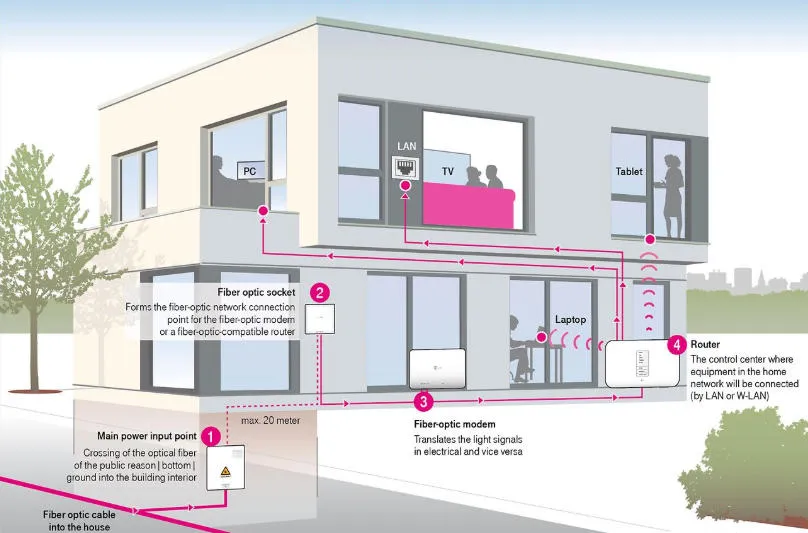
In this era of the Internet of Things, Home Fiber Optic Cable is no longer just for enthusiasts, but has become the "main artery" of modern smart homes. Whether you want smooth 4K/8K video playback, a low-latency gaming experience, or are preparing for future 10Gbps networks, understanding and properly deploying home fiber optics is crucial.
This article will provide you with a detailed analysis of the types, advantages, installation costs, and purchasing guide for home fiber optic networks, helping you build a faster home network.
What is Home Fiber Optic Cable? Why is it better than copper wire?
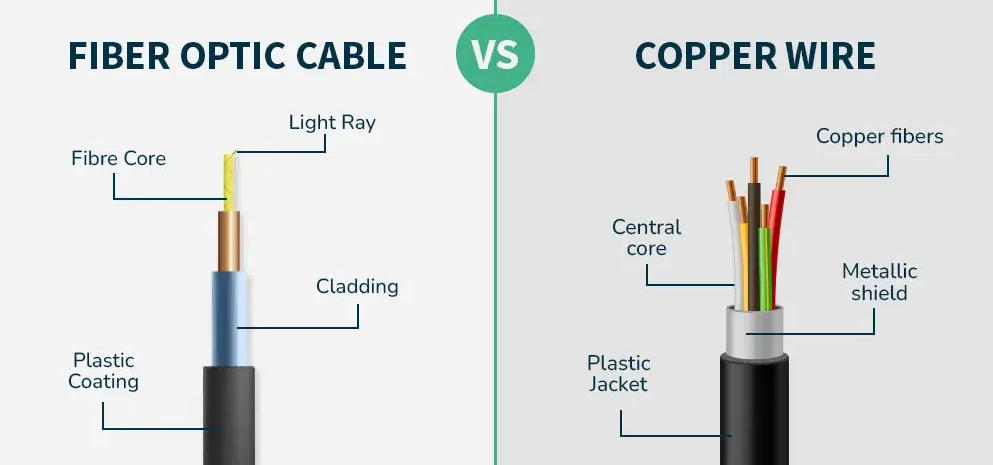
Fiber optic cables use light pulses to transmit data within glass or plastic fibers. They offer overwhelming advantages compared to traditional copper wires, such as telephone lines or coaxial cables.
Fiber Optic vs. Copper Wire: A Comparison of Core Advantages
High-speed transmission: Fiber optic cables support speeds from 1Gbps to 100Gbps or even higher, with minimal distance attenuation.
Low latency: crucial for gamers and video conferencing, as optical signals travel at near the speed of light, significantly reducing ping.
Interference resistance: Optical fiber is non-conductive, so it is completely immune to electromagnetic interference (EMI) and will not be affected by thunderstorms or high-power electrical appliances in the home.
Future compatibility: One-time cabling, remaining relevant for decades. Fiber optic cables have extremely high physical bandwidth, and upgrades typically only require replacing the devices at both ends (optical modem/router).
FTTH, FTTC, FTTN: Choosing the wrong one can result in a tenfold difference in speed.
When discussing home fiber optic connections, you'll often hear about the "last mile" of the connection. Not all services claiming to offer "fiber broadband" are the same.
| abbreviation | Full name | meaning | Recommendation Index |
| FTTH / FTTP | Fiber to the Home/Premises | Fiber optic cables are run directly into your home. This is a true all-fiber network. | ⭐⭐⭐⭐⭐ (Best) |
| FTTB | Fiber to the Building | Fiber optic cables are run to the building's hallway, and then connected to the apartment via network cables. This is common in high-rise apartments. | ⭐⭐⭐⭐ |
| FTTC | Fiber to the Curb | The fiber optic cable was run to a roadside electrical box, with the last section using old copper wire. Speed is greatly affected by distance. | ⭐⭐⭐ |
| FTTN | Fiber to the Node | Fiber optic cables only reach the community nodes; the majority of the journey is still done with copper wires. This is the slowest option. | ⭐⭐ |
Buying Guide: How to Choose the Right Fiber Optic Cable for Your Home?
If you plan to pre-install fiber optic cables inside the wall, or connect an optical modem (ONT) and router, you need to pay attention to the following parameters:
1. Single Mode vs. Multimode
Single-mode fiber (OS2): Yellow outer sheath. Suitable for long-distance transmission (several kilometers), but also perfectly usable for home wiring. It is currently the mainstream standard for FTTH. To ensure compatibility with the operator's fiber optic cable, it is generally recommended that homes pre-install single-mode fiber .
Multimode fiber (OM3/OM4): Cyan or violet outer sheath. Suitable for short-distance data center or home 10 Gigabit intranet connections, with slightly lower cost.
2. Connector type: SC or LC?
This is where users are most likely to make a mistake when buying.
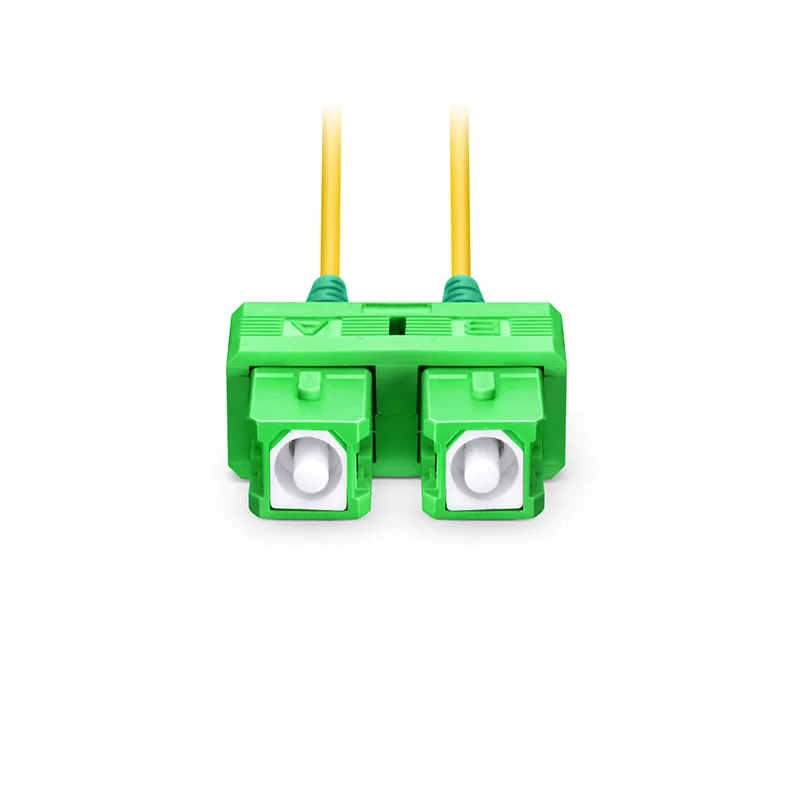
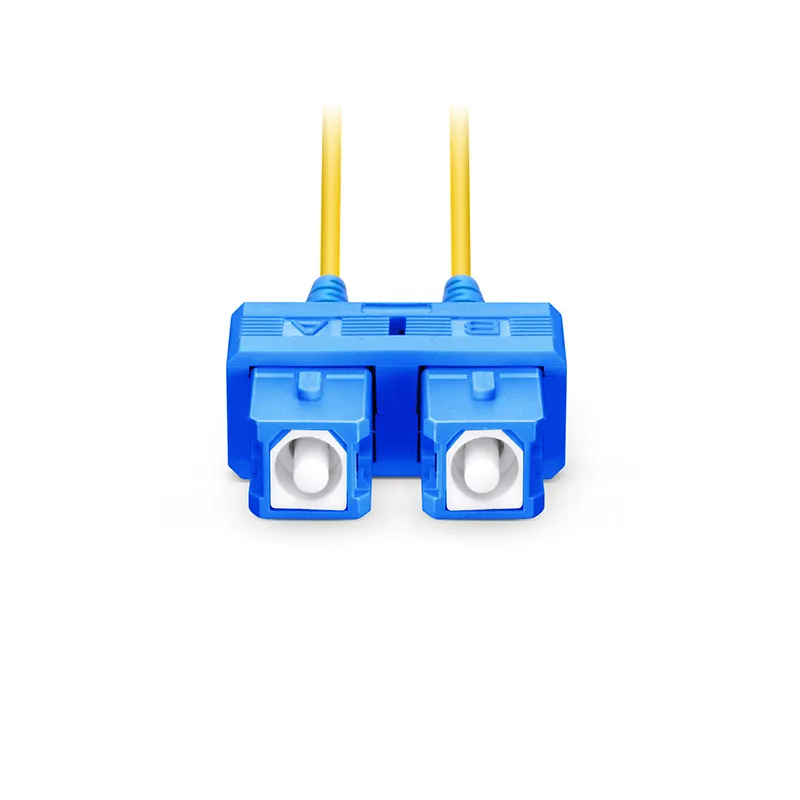
SC connector (square head): This is also the most common "optical modem interface". If you are buying a cable to connect the fiber optic socket and router on the wall, one end is usually SC.
LC connector (small square connector): Commonly found in enterprise-grade switches or SFP modules. You might use it if you're setting up a high-end 10 Gigabit LAN at home.
APC vs UPC (Grinding Method): Note the color of the connector end face!
Green (APC): Beveled grinding results in low return loss, and the vast majority of fiber optic cables delivered to homes by operators use green interfaces .
Blue (UPC): Surface grinding.
Important: Connect green to green and blue to blue. Do not mix them up , otherwise it will cause signal attenuation or even damage the interface.
Common Installation Scenarios for Home Fiber Optic Cabling
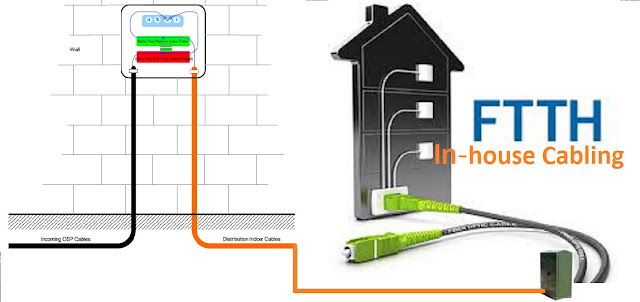
Scenario 1: Relocating the ONT
Many users have their fiber optic access boxes located in the weak current box at the entrance, resulting in poor Wi-Fi signal coverage.
Solution: Purchase a longer "SC/APC to SC/APC single-mode fiber optic patch cord" (usually green at both ends) to extend the optical signal to the center of the living room before connecting it to the optical modem.
This type of cable is very cheap: search "SC to SC Single Mode Fiber Patch Cable" on Amazon or other e-commerce platforms, and you can solve a big problem for just a few dozen dollars.
Scenario 2: Whole-house Fiber to the Room (FTTR)
This is currently the most advanced home networking solution.
Principle: Instead of using network cables, transparent, invisible optical fibers are run to each room.
Advantages: Each room can achieve speeds of 2000Mbps+, and the wiring is extremely concealed, without damaging the decor.
FAQ
To increase the chances of our articles appearing in Google's "People Also Ask" section, we have compiled the following frequently asked questions:
Q1: Can fiber optic cables be bent freely like network cables?
No. Optical fiber is made of glass fibers, and excessive bending will cause light signal refraction and loss (increased loss) or even breakage. Please keep the bending radius greater than 3 cm, or purchase bend-insensitive optical fiber cable.
Q2: What is the installation cost of Home Fiber Optic Cable?
If you only buy a pre-installed patch cord, the price is usually between $10 and $20. If it's a whole-house through-the-wall (FTTR) cabling system, the cost can range from $500 to $1500 (including equipment), depending on the size of the house and the complexity of the installation.
Q3: Should I buy OS2 or OM4 fiber optic cable for home installation?
For maximum compatibility and future upgrades, OS2 single-mode fiber is recommended. It is a standard used by telecom operators, seamlessly connecting to external networks, and supporting speeds and distances far exceeding home needs, truly achieving "one-time cabling, worry-free for life."
In summary: Now is the best time to upgrade to fiber optic internet.
Whether you're fed up with slow download speeds or planning a smart network for your new home, Home Fiber Optic Cable is the most sound investment available. It not only enhances your online experience but also adds technological value to your property.
Next steps:
Check your existing optical modem. If it's connected to a green port, congratulations, you've already connected to an FTTH network. To further improve Wi-Fi coverage, consider purchasing a longer fiber optic patch cable and moving your router to the center of your house.


